
-
By Louisa Dang, southernbendbooks.com
Two years ago, I worked at a small marketing company in Burlington. My boss was a whizz at finding new apps and software to keep track of all his clients’ projects. I quickly learned that such tools were much more efficient than my standard sticky notes-on-my-desk-and-keyboard approach!
Freelance writers can benefit from the many project management tools out there used by (and sometimes designed for) software developers, sales teams, business managers, medical professionals and many other industries. And because freelance writers tend to work in teams of one, the free “basic” plans are usually all we need!
Trello
At the marketing company, we used Trello to group projects by company, add to-do-lists, and prioritize work. It’s a valuable, easy-to-use tool, and for organization fanatics like me, it’s actually fun to use!
In Trello, you use “Boards” (similar to bulletin boards) to sort your projects. When you join Trello, it will ask you to create your first board. For example, I created a “JUMP!” board for the kids’ magazine I started this year:
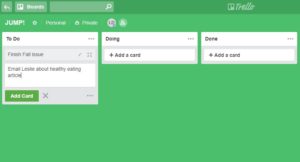
Each board is divided into sections – “To Do,” “Doing,” and “Done.” You can change the titles of these sections and add new ones. For example, I may change “Doing” to “In progress.” I could also add a “Revisions needed” section.
Under each section, you can add “cards,” which are basically tasks. Click on each card to add more details to each task. So, if I click on “Finish Fall issue,” the following window pops up:
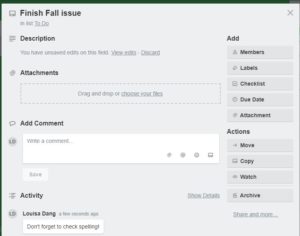
As you can see, each card provides a variety of options – you can add details and comments, attach related files, invite others to view your card, and tons more.
Workflowy
For those of you who love to outline, Workflowy may be your go-to tool. I am not a huge fan of outlining, but I know it’s necessary. And after hearing Don Vaughan’s workshop at the 2018 Write Now! Conference, where he explained the most efficient way to outline articles, I will definitely be doing more of it!
Workflowy is also great for list-making. You can easily set up work-related and personal lists and outlines. When you first sign up for Workflowy, a blank page appears, and you type your first topic(s):
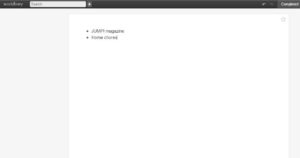
You can see that I created two topics – my kids’ magazine and a list of home chores! When I click on the bullet point for JUMP! magazine, another screen opens, allowing me to add more detail to this list:
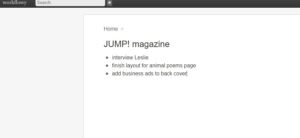
I can also press the “tab” key to indent bullet points, turning the list into a basic outline. When I’m finished adding details, I simply click on “Home” to return to the main topics page. Workflowy is simple and straightforward!
Todoist
Todoist is the most list-based of these three tools. It basically lets you create detailed project lists and group them by category, such as “work” or “personal.” You can also add your own projects, create subcategories, add tasks, and assign yourself deadlines for those tasks.
You basically work from one main screen, so it’s fairly intuitive:
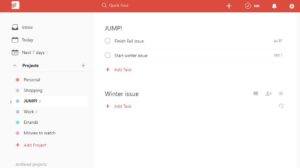
As you can see in the left column, I added a JUMP! project to the default list. You can also rename the default projects if those don’t work for you.
In the larger center area, I added two tasks under “JUMP!” and assigned due dates for those tasks. The software automatically placed “Winter issue” into a new category, which was quite helpful! I haven’t explored all the features of the basic account yet, but it looks like a useful tool for freelance writers who need a quick way to organize their to-do lists!
Explore What’s Out There
Many organizational tools have a “free” option, or a basic plan that’s just fine for most freelance writers. We don’t need a lot of bells and whistles, just a no-nonsense way to organize our projects, notes, and tasks. For those of us (me!) who work best under pressure, tools with a scheduling feature are especially useful. Both Trello and Todoist will email you reminders as deadlines approach.
So, while there are lots of software programs that offer specific writing and editing help (think ProWritingAid and Grammarly), expand your net and discover what other professionals are using. Like us, they must keep track of multiple projects, deadlines, and contacts – if the technology works for them, why not us!
What free or low-cost online tools have you found helpful to your writing business?
Louisa is a fiction writer and freelance marketing writer. She’s done just about every kind of writing under the sun, including technical writing and newspaper reporting. She’s also been a fact checker and copy editor for Our State magazine and has taught English at the college level.
- Reageer
919-888-8198
3819 Donna Road
Raleigh, NC 27604